# C-Christmas tree
It's Christmas time 🎄 and what could be nicer than _programming a Christmas tree in C_ with lights that fade in and out?. Or just talk about trees. We love trees 😄. Here's what we'll do:
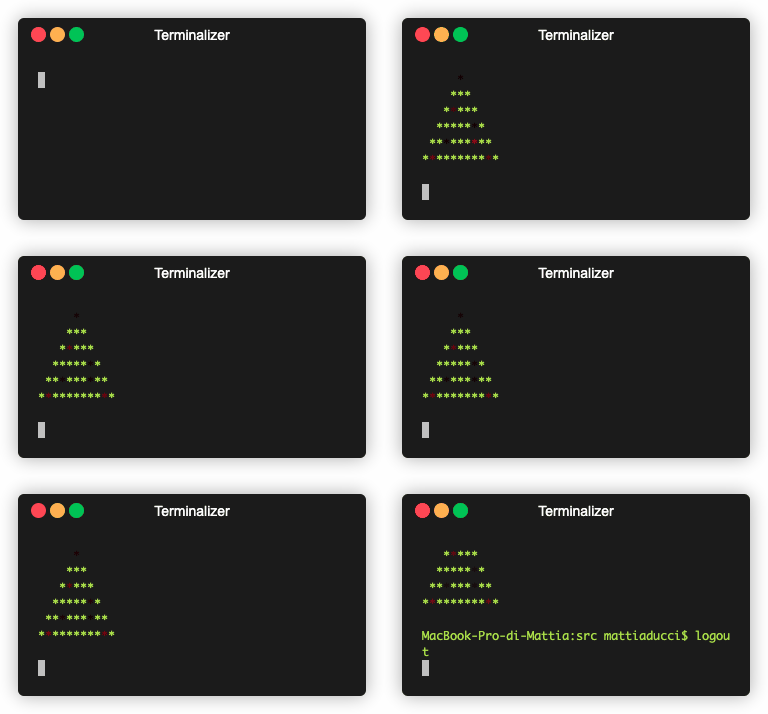
> Article originally posted on the [ByteGarage website!](https://www.bytegarage.co/post/c-christmas-tree): check it out for other articles and Dev tips
We'll _not_ start from scratch, but we'll see some interest parts of the complete code that you can find [here](https://github.com/bytegarage/c-christmas-tree). In particular we'll focus these topics:
1. ANSI Escape sequences
2. pointers
3. C language (obviously ❤️)
Let's get started!
## 1. Setup the environment
[Download the project](https://github.com/bytegarage/c-christmas-tree) and open the root folder in your favourite editor. We like [_VSCode_](https://code.visualstudio.com) because it's configurable, extensible and has a lot of extensions for every language and developer need.
You should see only the `src` where all the sources are. From the terminal create a new folder `bin` in the root:
```sh
mkdir bin
```
Make sure you've a terminal that support ANSI escape sequences. We use [Oh My Zsh](https://ohmyz.sh/#install) on the terminal integrated in VSCode or [iTerm2](https://iterm2.com) if you use macOS systems. For a quick test run the final project and check if the output is like the one in the GIF above.
## 2. Explore the project
The most important files are `christmas.c` and `console_color.c`.
`christmas.c` holds the `main()` and the higher level logic of the program. It also loads the `.txt` file that contains the shape of our Christmas tree and where the lights are located. To define the shape use any characters, spaces and newlines, to define light use the `$` character. An example has given blow
```txt
$
***
*$***
*****$*
**$***$**
*$*******$*
```
`console_color.c` contains the functions to write ANSI code to the `stdout` (the terminal output)
## 3. How this code works?
Let's dive into the `main()` function of the `christmas.c` file.
First we create two arrays `str` and `line`:
* `str` to store the raw parsed input from the `tree.txt` file read from the `load_happiness()` function.
* `line`, derived from the `str` array, put a random **negative** number in place of the character `$`. This variable is of type `char`, which is normally intended as `signed char` by compilers (i.e with range `[-127,+127]`) and is thought to be used **considering the 1 byte integer values of each element** as defined is the [ASCII table](https://www.asciitable.com). Negative numbers are not encoded in the ASCII table and in our case each of them will be handled by the `plot()` function to change the color of our baubles.
You can note that in the following code where we compute the `line`, we don't use the `line` variable itself, but a pointer to it. Indeed write `char *pc = str;` is like writing `char *pc = &str[0]`.
```c
while(*pc) {
*pl++ = (*pc != '$') ? *pc : (char)random_min_max(-100, -1);
pc++;
}
*pl = '\0';
```
That's the pointer arithmetic beauty ✨
Being a `char` pointer, each time we increment it, we go forward by a character, **like an index increment in an array**, but more concise!
### 3.1. Go ahead! Code like a designer!
We are approaching the more graphical part.
Apart from the _while_ loop that at the end of every cycle sleeps for _100ms_, **we'll focus on the following functions**: `clrscr()`, `plot()`, `gotoxy()` because they use _ANSI escape codes for controlling the terminal, a.k.a (CSI - Control Sequence Introducer)_. I think the quickest way to explain them is saying:
> Not every prints on the command line output some text
Indeed **certain sequences of character are interpreted as instruction** that allow to change the text color, move the cursor or clear the console screen and other funny stuff. **Some of them are even parametric!!** 🔝 You can find a list of available _CSI_ [here](https://gist.github.com/natanaeljr/8b26dba7b876e2c006bfa28a4147b407)
**Try it yourself!** Open a terminal, run some commands that produce output such as `ls` and finally run this command:
```sh
echo "\033[1J"
```
All the output on the console disappeared. This simple example is exactly the same the function `clrscr()` does. _Check it out_ briefely
Below the `clrscr()` function implementation in `console_color.c`
```c
void clrscr() {
__puts(CLEAR_SCREEN);
}
```
where `__puts(s)` is an alias for `fputs(s, stdout)`
```c
#define __puts(s) fputs(s, stdout)
```
that **put on `stdout`**(actually prints) a string `s`. The string under consideration is the constant `CLEAR_SCREEN` defined as
```c
#define CLEAR_SCREEN "\033[1J"
```
_**Hey! The exact sequence we previously run on the terminal!**_
### 3.2. Hang in there! We are almost there
`plot()` and `gotoxy()` functions _are not so different_ from `clrscr()` except for the fact that the escape sequence they use is not fixed, but is **parametric**.
Looking for occurrencies of `gotoxy()` in the project we find out that is called once per cycle as the first instruction called in the main while loop and always carry the cursor at position `(1,1)` (`gotoxy(1,1)` that is the _terminal screen top left corner_). The _CSI_ is
```c
#define GOTO_ROW_COL "\033[%d;%dH"
```
and we use the `fprintf` function to put on the `stdout` a formatted string with two integers `%d` passed as parameters
The `plot(line)` function is called with the `line` parameter (even if the name can be misleading this is not a single line of our input, but is the variable that contain random numbers in place of `$` characters in the `tree.txt` input file). Here's where the Christmas magic happen, so we'll see it more closely:
1. It cycles for each character in the string with same logic saw [above](#pointers_cycle)
2. **For each character we check the value**:
* if it's greater than 0, set the console characters color as green `set_color(color_green)` and put the character as is to `stdout`. It will be printed in green (*).
* **Here the most magical part!.** If it's less than or equal to 0
1. Sets the console color as a function of the character value (`set_color_rgb(color,0,0)` where `color = -(*p * 2)`. We'll talk about color values in a bit)
2. Prints the `*` character on the `stdout` in place of the number
3. **Gradually decrement the pointer value** until a minimum, after which it returns the value to an upper bound and starts decreasing again
3. It clears out the `stdout` with the `fflush(stdout)`
#### 3.2.1. Finally the color values explanation
The point 2 above makes a decision based on the pointer value, and the code suggests that we need to _put the character `*` where we've a negative pointed value_. Our output has all `*` and our `tree.txt` input has all `*` too except where the light should be located. That means that the `else` part of the decision part is related to the random number generated during the [creation of the `line` variable](#pointers_cycle). Indeed the `*` corresponds to the integer 42 in the [ASCII table](https://www.asciitable.com) and we leave it as it is. On the contrary, when we meet the `$` character we generate a random number in the range `[-1,-100]`. "Where the magic happens" above, at the point `a` defines the color as
```c
unsigned char color = -(*p * 2)
```
to normalize the value to pass in the `set_color_rgb()` function that use another _CSI_ to set a color from a RGB tern:
```c
#define RGB_FOREGRAUND_PATTERN "\033[38;2;%d;%d;%dm"
```
It would be enough to invert the sign of `*p` to have the desired effect. The multiplier factor `2` is **only** to extend the range to better see the light fading effect using more the `[0,255]` RGB range. Note that we can do this multiplication because **we have defined `color` as `unsigned char`**, that has a range `[0,255]`. If we had defined `color` as simply `char`, we would have a range betwenn `[-127,127]` since the `char` is signed by default and with the `* 2` multiplication, we could have gone into overflow.
If you check `set_color_rgb()` function there are some bitwise operators to work with RGB color components, but these are not the focus now. I just wanted to highlight it only to explain why we turn each "light character" value greater than 0 and with a value `<= 255` (**each channel in the RGB encoding is** `8bit ~> [0,255]`)
### 3.3. Add time to our code
The very last part of our walkthrough is given by adding the time to our code. The last instruction of the _while_ loop in the `main()` function in `christmas.c` is `sleepms(100)` defined in `console.c`. It just sleeps for _100ms_, otherwise we would not be able to see the effect of the lights since the program would terminate almost immediately. With this sleep time we can see each each babule's color for _100ms_.
Thanks for reading and merry C-Christmas!!! 🎅
------
Article inspired by the _**redmax**_ code hosted on [GitHub](https://github.com/bytegarage/c-christmas-tree)